
Dashboard
All information on one screen
Real-time overview for forwarders in Sprinter 3000
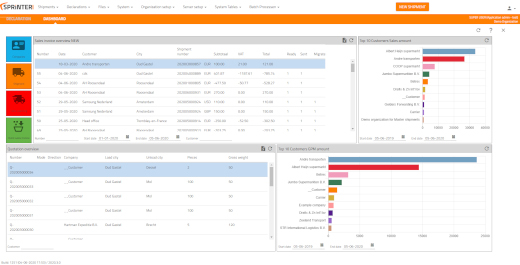
Sprinter 3000's overview screen is the central place for freight forwarders and transport-driven SMEs. At a glance, you can see real-time information on shipments, records, margins, WMS orders and customs statuses. Thanks to smart widgets you create your own Dashboard and adjust your data immediately - without separate screens or time-consuming exports. This way, you steer daily on facts, not feelings.
What does this overview entail?
The central cockpit bundles key figures, lists and alerts. Think open files, milestone delays, pick/pack progress, billing status and workload per employee. All tiles extract their real-time information directly from Sprinter 3000 and refresh automatically. You choose what you see, in what order and with what filters.
Why do shippers choose the Sprinter 3000 Dashboard?
- Deciding faster: current KPIs and alerts (ETAs, exceptions, deadlines).
- Fewer clicks: from widget to detail with one click and back again.
- Instant correction: data easy editing from the widget (rights-based).
- Focus on margin: visibility of costs, revenues and credit risk per customer or file.
- Team steering: goals, tasks and bottlenecks by department visible.
- Better service: proactively inform customers in case of discrepancies.
Which widgets and KPIs are available?
Imagine Dashboard Along with tiles such as:
- Consignments & files: To be scheduled today, delayed, incomplete, pending documents.
- WMS & inventory: open picks, backorders, inbound/outbound, top SKUs.
- Customs & compliance: status declarations, missing HS codes, DMS/DVA progress.
- Financial: margin per modality, billable, outdated open items.
- Operation: workload per planner, lead time per step, first-time-right percentage.
- Customer service: track-and-trace exceptions, SLA alerts, claim overview.
Each widget shows real-time information and supports filtering (customer, modality, period), sorting and drill-down to the underlying record.
Who is the Dashboard for?
For the freight forwarder who manages all modalities and wants to switch quickly between planning, WMS and declarations. Especially for freight forwarders: compact, understandable and yet powerful enough to carry growth. Whether you air freight with e-AWB does, planning road transport with CMR, or running a warehouse: it Dashboard keeps everything together.
Does the Dashboard integrate with WMS and customs?
Yes. It Dashboard reads and shows real-time information from the Sprinter 3000 modules, such as WMS, rate/margin, customs (including DMS/DVA) and invoicing. This allows you to see operational and financial impact side by side and adjust faster.
Maybe your question about the dashboard is below?
Security and rights
The Dashboard respects Sprinter 3000's rights model. Employees see only what is intended for them; easy editing is adjustable per role. All actions are logged so you can always retrace who modified what.
Result: more grip, less noise
With the Dashboard you work proactively instead of reactively. No loose lists, no duplicate exports. One overview screen with real-time information that your team uses daily to plan better, bill faster and monitor margins.
Getting started
Sparring with a specialist: We think about KPIs, widgets and adoption.
Schedule a demo: see your processes live in the Dashboard.

Your own dashboard
Find out what SPRINTER 3000 can do for you and make yourself comfortable.